SafeScreen 01 In practice 02 Detection 03 Frames 04 Scope Source

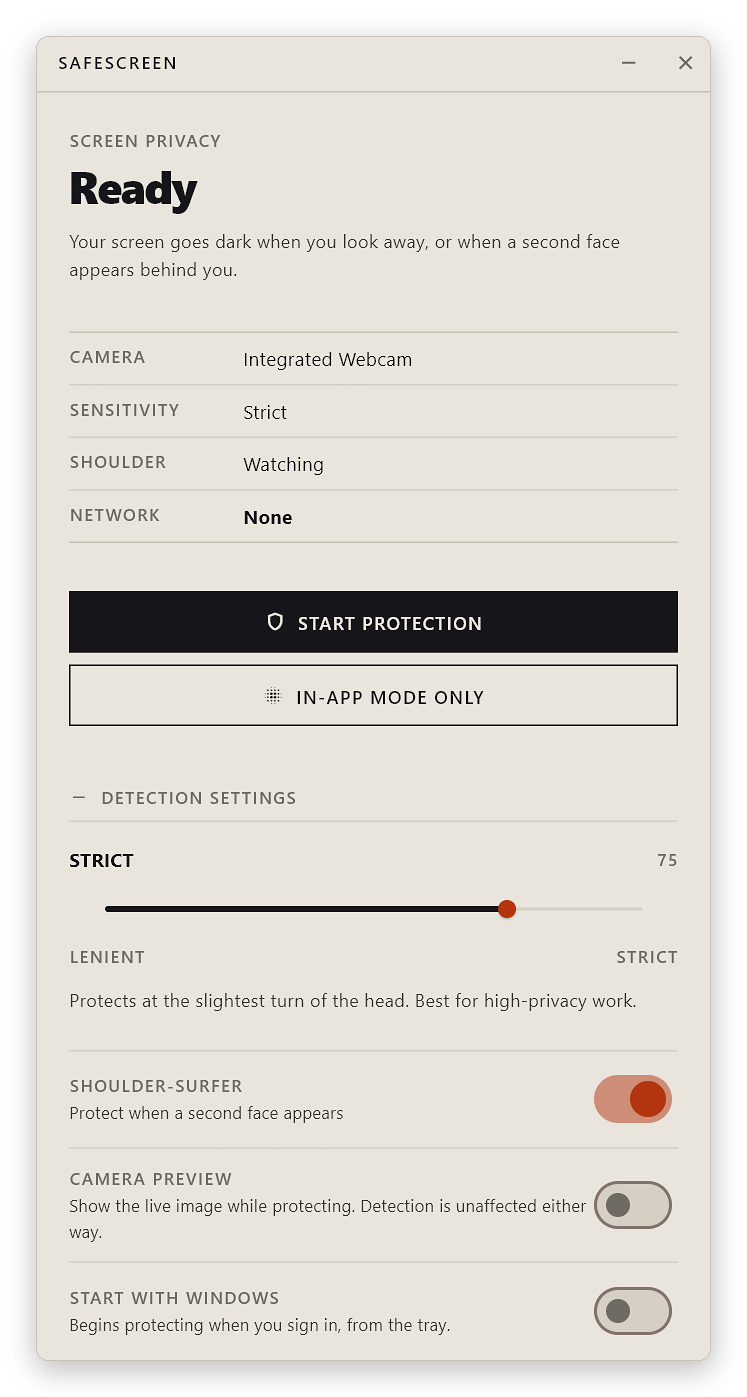
Your screen goes dark when you look away.

Most people reading your screen aren't snooping. They're just sitting behind you, and screens are extremely readable. SafeScreen doesn't ask anyone to be polite — it removes the opportunity.

It reads your head position through the webcam, and blacks the screen out the moment you stop looking at it — or the moment a second face appears behind you.

Download for Windows Read the source
.env — production CAMERA ACTIVE

Screen protected

Waiting for camera

Protected 0/3 frames

Not a video, and not a mockup — this runs the same state machine as the app. One disqualifying frame hides; three consecutive good ones reveal. Switch tabs or move your cursor off the page and it will protect itself.
Platform
Windows 10 (1809+) & 11 · x64
Detection
BlazeFace via TFLite — on device
Network
None. No telemetry, no update check, no account
Install
Unzip and run · no installer · no admin rights
Licence
MIT · built with Flutter
Signing
Unsigned — SmartScreen will warn. Verify the checksum

01In practice

For anyone who has ever angled their laptop away from someone.

You know the moment. You tilt the screen a few degrees, or you casually alt-tab to nothing in particular, and then you feel faintly ridiculous for doing it. This is the fix for that reflex.

  • Trains and planes A tray table is not a private office, and the person opposite has an excellent viewing angle.
  • Open-plan offices Where "have you got a quick second?" arrives from behind you, mid-sentence, at walking pace.
  • Cafés and libraries The best power socket is never the seat with its back to a wall.
  • Getting up for coffee The most common way a screen gets read is nobody being at it. Walk away and it goes dark on its own.

A second face is one too many

Shoulder-surfer detection protects the screen when someone else appears in frame — even while you are still looking at it yourself. On by default, and switchable off if you share a desk.

Adjustable patience

Five sensitivity steps, from "I fidget constantly" to "what is on this screen must not leave this room". It changes both the angle it tolerates and how eagerly it hides.

It learns your face, never your identity

Calibration works out your neutral head position so detection fits your proportions rather than an average. It has no idea who you are, and stores nothing that could work it out.

It shows its working

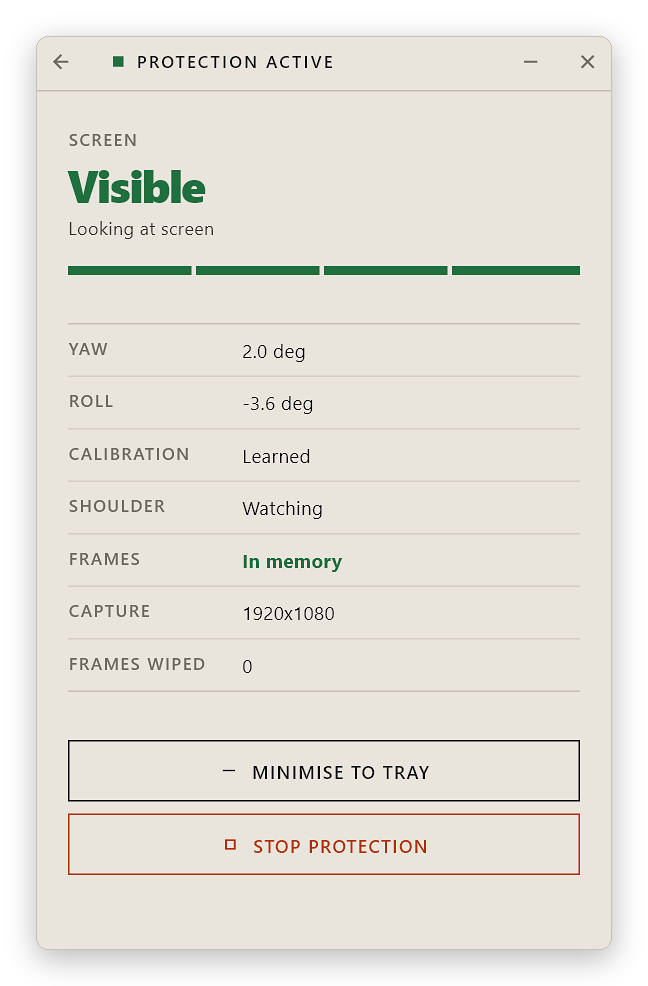
The status panel keeps a live count of capture files erased. A privacy tool asking for your webcam should be able to prove what it did with the frames, rather than asking nicely to be believed.

Quietly resident

Minimises to the system tray and keeps working. There is also an in-app mode that blurs only its own window, if you would rather not grant anything system-wide.

Breaks safely

Camera unplugged, detector wedged, frames stopped arriving — every one of those hides the screen. It will never leave your work on display because something failed quietly in the background.


02Detection

Geometry, not guesswork.

The Windows face detector reports six facial keypoints and never a head angle. Those six points are enough to recover the angles analytically, which is what makes this more than proximity detection.

 webcam ──▶ capture ──▶ shred file          ◀── frame destroyed here,    before anything elseBlazeFace ──▶ 6 keypoints ──▶ head pose
                                              yaw · roll · pitch
                                                    │
                                                    ▼
                                              hysteresis ──▶ ■ / □
01

Yaw, from a cylinder

Model the head as a cylinder: nose at the front, ear points at ±90°. The nose's normalised position t between the two ears collapses to a tangent, so the angle falls straight out.

yaw = atan((t − 0.5) × 2)
02

Pitch, calibrated to you

How far your nose sits below your eye line is a fact about your face, not about your attention — a fixed threshold misfires on real people. SafeScreen learns your neutral value and measures drift.

deviation = ratio − learned_neutral
03

Weighted toward hiding

Hiding takes one bad frame. Revealing takes several consecutive good ones. Flickering to "protected" is an annoyance; flickering to "visible" is a privacy failure. They are not treated as equal.

framesToProtect ≤ framesToReveal

03Frames

Where your camera frames actually go.

The part most tools would leave out of the marketing.

They touch the disk. Briefly. Here is exactly how.

The Windows camera plugin has no streaming API — the only way to get a frame is to take a photograph, and it writes that photograph to disk before any of SafeScreen's own code can see it. By default the destination is your Pictures folder, which on most machines syncs to OneDrive. A detector sampling several times a second would therefore upload thousands of photographs of your face.

So SafeScreen ships a forked plugin whose single change redirects captures to %TEMP%\SafeScreenFrames — not a sync target — then overwrites each file with zeros and deletes it the instant it has been read, on every code path, sweeping any survivors at shutdown.

Frames stay on your machine and do not outlive their read. But they are written, and zeroing is best-effort on copy-on-write filesystems and wear-levelled SSDs. Removing disk writes altogether needs a native capture path, which is the top item on the roadmap. Full detail in SECURITY.md →


04Scope

What it is not.

A privacy tool that overstates itself is worse than none at all.

  • Not a lock screen It authenticates nobody and will not stop someone using your keyboard. That is what Win+L is for.
  • Not exact on mixed-DPI desks Every display is covered, but where monitors run at different scale factors the cover can land slightly off. One display uses exclusive fullscreen, which is exact.
  • Not face recognition It knows a face is present and roughly where it points — not whose it is. Shoulder-surfer detection triggers on any second face, including one on a poster.
  • Not signed Certificates cost more than this project has, so SmartScreen will warn you. Verify the checksum instead.

05Verify

Check what you downloaded.

Every release is built by GitHub Actions from a tagged commit — never uploaded from a developer's machine — and carries a provenance attestation you can check against this repository.

PS> Get-FileHash .\SafeScreen-windows-x64.zip -Algorithm SHA256
$ gh attestation verify SafeScreen-windows-x64.zip --repo kv4u/safescreen